Best Navigation App for China: Apple Maps vs Amap (Gaode) & Why Google Maps Drifts
Use Apple Maps on iPhone for instant English routing or Amap (Gaode Maps) in English mode on Android and iOS for exact subway exits and live bus ETAs. Avoid Google Maps in mainland China due to 500m GPS drift.
· By Yunjie

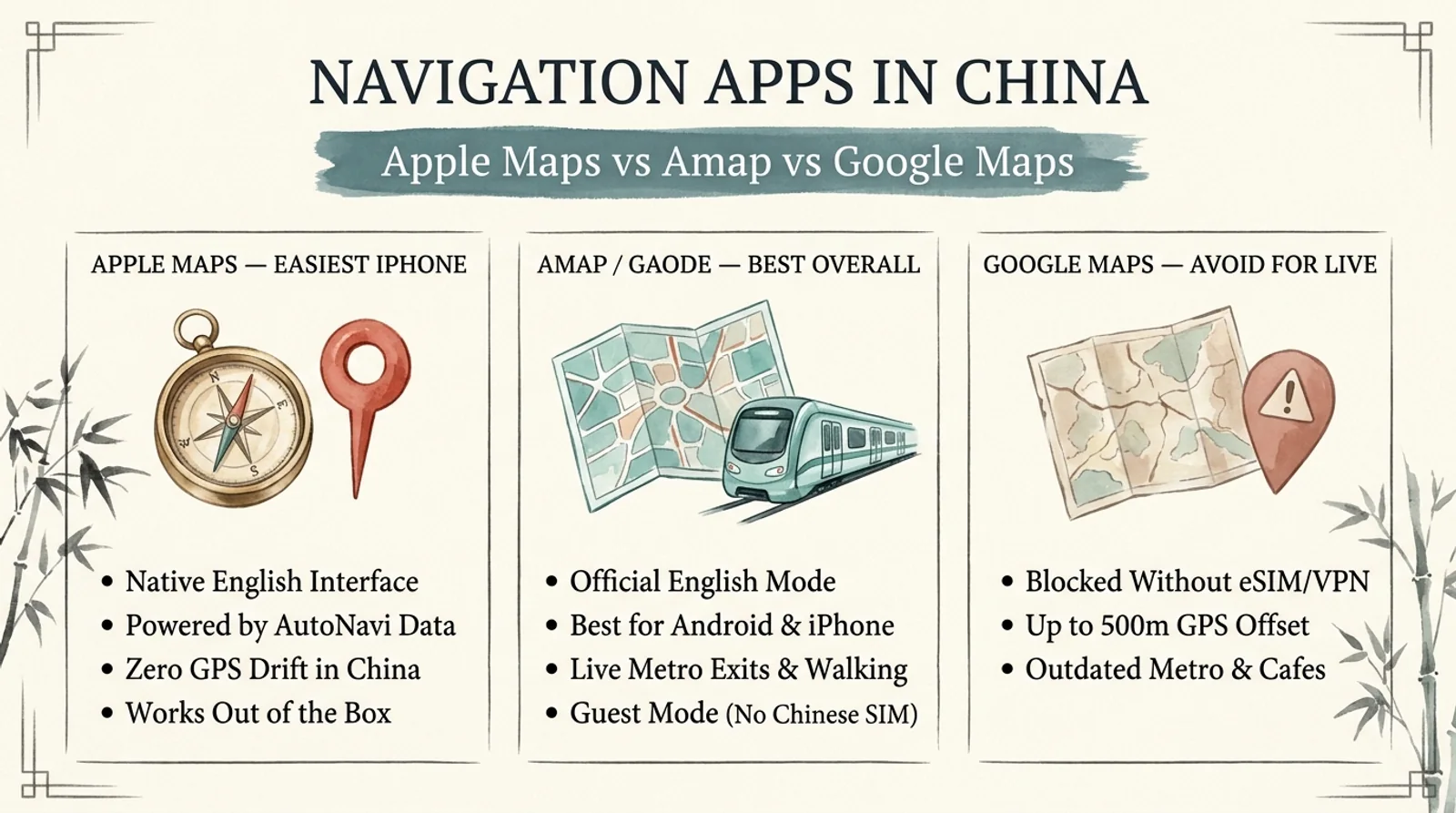
The best navigation app for China is Apple Maps (for iPhone users who want instant English routing out of the box) or Amap / Gaode Maps in English mode (best overall for both Android and iPhone, with exact subway exit letters, live bus ETAs, and walking paths). Avoid relying on Google Maps inside mainland China—even with a travel eSIM or VPN, Google Maps suffers from up to 500 meters of GPS offset and outdated subway lines.
Opening Google Maps on your first morning in Beijing or Shanghai is one of the fastest ways to walk in circles. Even when your roaming eSIM bypasses firewall blocks, Google's street layer does not match satellite imagery in China, newly opened metro lines are missing, and closed restaurants still show as open.
Here is why Google Maps breaks in China, how Apple Maps and Amap (Gaode Maps) compare side by side, and how to set up English navigation before you land.
Quick Comparison: Navigation Apps in China
| App | Works on iPhone / Android? | English Interface | GPS Accuracy in China | Metro Exits & Live Transit | Chinese Phone Needed? |
|---|---|---|---|---|---|
| Apple Maps | iPhone / iPad only | Native full English | Exact (powered by AutoNavi / Amap inside China) | Good (major cities & metro lines) | No |
Amap / Gaode (高德地图) (Best Overall) |
Both iOS & Android | Official built-in English mode | Exact (China's #1 native map engine) | Best (exact Exit A/B/C letters, transfer car tips, live bus) | No (guest mode works) |
Baidu Maps (百度地图) |
Both iOS & Android | Mostly Chinese UI | Exact | Excellent (Chinese labels) | No (guest mode works) |
| Google Maps | Both (blocked without eSIM/VPN) | Native English | Poor (100–500 m GCJ-02 street offset) | Outdated lines & missing stations | No |
Why Google Maps Fails in Mainland China (The GCJ-02 Offset)
Many travelers assume that buying an international eSIM or turning on a VPN fixes Google Maps. It does not, for two technical reasons:
- The GCJ-02 coordinate shift: Mainland China requires licensed domestic map providers to apply an obfuscated coordinate system called
GCJ-02(often nicknamed "Mars coordinates"). Because Google no longer maintains licensed local mapping operations in mainland China, its satellite view and street map sit misaligned by 100 to 500 meters—meaning your blue GPS dot can appear in the middle of a river or two blocks away from the actual intersection. - Years of missing transit updates: Chinese cities open dozens of new subway lines, extensions, and high-speed rail stations every few years. Google Maps misses newer metro routes in Beijing, Shanghai, Chengdu, and Xi'an, and frequently sends you to demolished entrances or closed businesses.
Use Google Maps only for pre-trip research at home (to read English reviews and save pins), then switch to Apple Maps or Amap the moment your plane lands.
Option 1: Apple Maps (Easiest Choice for iPhone Users)
If you carry an iPhone, Apple Maps automatically switches to AutoNavi (Amap) mapping data the moment your phone detects a mainland China location. You do not need to download anything extra, create a new account, or change language settings.
- What works well: Turn-by-turn walking directions, subway routing in Beijing, Shanghai, Chengdu, Xi'an, Guangzhou, and Hangzhou, and clean English labels for major landmarks, hotels, and metro stations.
- Where Apple Maps falls short: Smaller local noodle shops, boutique guesthouses, and newly opened cafes often fail to appear when typed in English, and it does not show real-time intra-station subway transfer tips as clearly as Amap.
- Important limitation: Apple Maps' China map data only loads cleanly once you are physically inside China (with mobile data active). If you test a Beijing route from New York or London, the map reverts to Apple's global layer and looks sparse.
Option 2: Amap / Gaode Maps (Best Overall for Android & iPhone)
Amap (高德地图, also listed as AMap Global) is the official English-enabled version of China's most widely used navigation engine—highlighted by the Shanghai Municipal Government's official English Amap guide for international visitors. For Android users, Amap is essential; for iPhone users, it is the single best backup to Apple Maps.
How to Switch Amap to English (No Chinese SIM Needed)
- Download
AMap Global(or高德地图) from the Apple App Store or Google Play Store before leaving home. - Skip login if prompted: You can browse maps, search addresses, and run walking or subway navigation in guest mode without a mainland Chinese phone number.
- Switch to English (if it opens in Chinese):
- Tap Me (
我的) in the bottom-right corner. - Tap the Settings gear (
设置) in the top-right corner. - Tap General (
通用设置) → Language (语言) → English.
- Tap Me (
- Check live subway details: When routing by metro, Amap shows which exact carriage sits closest to your transfer escalator, the exact exit letter (
Exit B,Exit D), and the first/last train times—a huge time-saver in sprawling stations like People's Square or Xizhimen.
For step-by-step metro ticket and gate rules in China's two biggest cities, pair Amap with our Beijing Subway guide and Shanghai Metro guide.
Four Practical Habits for Stress-Free Navigation in China
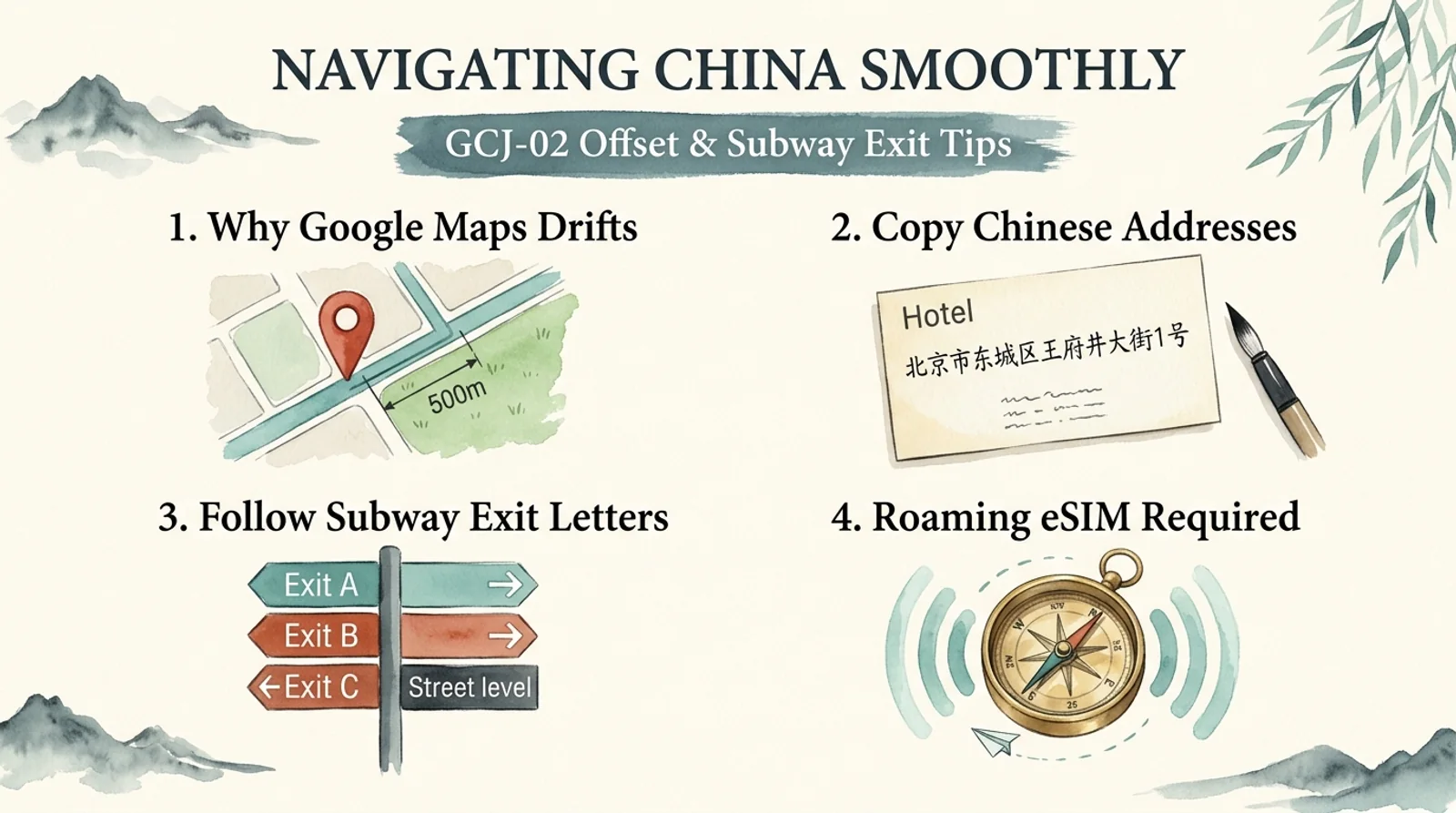
- Save Chinese addresses for every hotel and restaurant: Even in English mode, Amap and Apple Maps find obscure spots instantly when you paste the Chinese name or street address from your booking confirmation. Keep a quick note on your phone with your hotel's Chinese name (
酒店名称) and address (地址) so you can paste it into Amap or show a taxi driver. - Always follow the subway exit letter: Major Chinese metro stations have 6 to 20 exits spread across huge multi-lane avenues. Walking out the wrong exit can add 15 minutes of crossing pedestrian overpasses—always check the exact exit letter (
Exit A,Exit C2) in Amap before swiping out. - Use DiDi inside Alipay for car rides: While Amap includes built-in ride-hailing in Chinese, foreign visitors without a Chinese bank card should stick to the English DiDi Travel mini-program inside Alipay for rides (see our how to use DiDi in China guide).
- Arrive with working mobile data: Both Apple Maps and Amap require an active internet connection for live routing and search. Set up a travel eSIM before departure so your maps load the instant you clear immigration—details are in our China eSIM guide.
If you are mapping out your first city days right now, test your hotel locations against our 4-day Beijing itinerary and 3-day Shanghai itinerary.
Frequently Asked Questions
Does Google Maps work in China with a VPN or travel eSIM?
It loads if you use an international roaming eSIM or VPN, but it is still unreliable for live navigation. Because of mainland China's GCJ-02 coordinate shift and years of unmaintained local transit data, pins can drift 100–500 meters off the road and newer metro lines are missing.
What is the best navigation app in China for Android users?
Amap (AMap Global / 高德地图) is the best choice on Android. It offers an official built-in English interface, works in guest mode without a Chinese phone number, and gives exact walking routes, live bus ETAs, and subway exit letters.
Does Apple Maps work accurately in China?
Yes. Once you are physically inside mainland China with mobile data active, Apple Maps automatically uses AutoNavi (Amap) map data, giving accurate GPS positioning, walking routes, and subway directions in native English.
Do I need a Chinese phone number to use Amap in English?
No. You can download AMap Global, switch the language to English in Settings, and use search, walking, and public transit navigation in guest mode without registering a Chinese SIM card.
Should I download offline maps before flying to China?
Downloading offline city maps in Amap (for Beijing, Shanghai, Xi'an, or Chengdu) is helpful as a backup in deep subway tunnels, though you still need live mobile data for English address search and real-time transit routing.
Last checked: November 21, 2026.